Variables & Data Types
1. Variables
A variable is a named memory location used to store a value during program execution. Every variable in Java has three components:
- Type — determines what kind of value can be stored and how much memory is allocated
- Name — an identifier used to reference that memory location
- Value — the data currently stored at that location
Declaration and initialization
// Declaration — allocates memory, no value yet
int age;

// Initialization — assigns a value for the first time
age = 28;

// Declaration + initialization together — the most common form
int age = 28;
Local variables must be initialized before use — the compiler will reject the code otherwise.
int score;
System.out.println(score); // ❌ compile error: variable score might not have been initialized
Naming conventions
Java uses camelCase for variable and method names:
int studentAge = 20;         // ✅ camelCase
String firstName = "An";     // ✅
boolean isLoggedIn = false;  // ✅ booleans often start with is/has/can

int StudentAge = 20;   // ❌ PascalCase — reserved for class names
int student_age = 20;  // ❌ snake_case — not Java convention
int 2fast = 0;         // ❌ cannot start with a digit
int class = 1;         // ❌ reserved keyword — cannot use as variable name
Variable names should be nouns that clearly describe what they hold. Avoid x, temp, data unless context makes the meaning obvious.
Variable categories
| Category | Declared where | Scope | Default value |
|---|---|---|---|
| Local variable | Inside a method / block | That block only | None — must be initialized |
| Instance variable | Inside a class, outside methods | Entire object | Yes (0, false, null) |
| Static variable | Inside a class, with static |
Entire class | Yes (0, false, null) |
| Parameter | Method parameter list | Inside that method | The value passed in |
public class Student {
    String name;           // instance variable
    static int count = 0;  // static variable

    void greet(String greeting) {                // greeting is a parameter
        String message = greeting + ", " + name; // message is a local variable
        System.out.println(message);
    }
}
Note
Instance variables and static variables will be covered in detail in the OOP section. For now, just recognize that they exist.
2. Data Types
Every variable must declare a type — this is the defining characteristic of a statically typed language like Java. The type determines what values can be stored, how much memory is allocated, and what operations are valid.
In Java, every value belongs to one of two fundamentally different worlds in terms of storage and access:
| Group | Examples | Stored where | Stores |
|---|---|---|---|
| Primitive | int, double, boolean |
Stack | The actual value |
| Reference | String, int[], any Object |
Stack + Heap | Address of the object |
The primitive vs reference distinction is the foundation for understanding:
- Why
==behaves differently withintandString - Why passing an object to a method does not "copy" it
- Why
Integerin a tight loop can slow your application down - Why
nullonly exists for reference types, never for primitives
This is also the most common interview topic at the Junior level.
3. Primitive Types
Java has exactly 8 primitive types, handled directly by the JVM without allocating objects on the Heap:
| Type | Size | Default | Range |
|---|---|---|---|
byte |
8 bit | 0 | -128 to 127 |
short |
16 bit | 0 | -32,768 to 32,767 |
int |
32 bit | 0 | -2^31 to 2^31-1 |
long |
64 bit | 0L | -2^63 to 2^63-1 |
float |
32 bit | 0.0f | ~7 decimal digits |
double |
64 bit | 0.0d | ~15 decimal digits |
char |
16 bit | '' | 0 to 65,535 (Unicode) |
boolean |
JVM-specific (typically 1 byte in arrays, 4 bytes in fields) | false | true / false |
int age = 25;
double pi = 3.14159;
boolean isActive = true;
long population = 8_000_000_000L; // L suffix required for long literals
Never use float or double for money
They store binary approximations, not exact decimal values:
Use java.math.BigDecimal for all monetary calculations.
Java 25 — Primitive Types in Patterns (JEP 507, Preview)
Java 25 extends pattern matching to primitive types, removing the need to box before matching:
// Before Java 25 — required boxing or if/else chains
int score = 85;
String grade;
if (score >= 90)      grade = "A";
else if (score >= 70) grade = "B";
else                  grade = "C";

// Java 25 preview — primitives directly in switch
String grade = switch (score) {
    case int i when i >= 90 -> "A";
    case int i when i >= 70 -> "B";
    default                  -> "C";
};
4. Reference Types
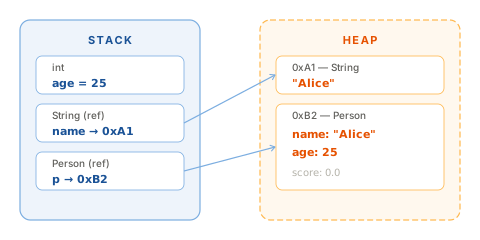
A reference type stores an address pointing to the actual object on the Heap — not the object itself.
Think of it like a piece of paper with an address written on it. The paper is not the house — it just tells you where the house is.
"Alice"lives on the Heap.nameis a reference on the Stack holding that object's address.copydoes not create a new object. It receives the same address asname— both point to the same object.
5. == vs .equals()
== always compares the value sitting directly on the Stack:
- With primitives: compares actual values → works as expected
- With references: compares addresses → not content
// Primitive — == works as expected
int x = 5;
int y = 5;
System.out.println(x == y); // true

// Reference — == compares addresses, not content
String s1 = new String("hello");
String s2 = new String("hello");
System.out.println(s1 == s2);      // false — two different objects on Heap
System.out.println(s1.equals(s2)); // true  — same content
Safe comparison pattern
Always use .equals() to compare String content.
Put the literal first to avoid NullPointerException:
// Dangerous — NPE if userInput is null
if (userInput.equals("admin")) { ... }

// Safe — literals are never null
if ("admin".equals(userInput)) { ... }
6. var — Type Inference (Java 10+)
Java 10 introduced var, letting the compiler infer the type from the right-hand side.
This is standard syntax in modern Java — less repetition without losing type safety.
var name    = "Alice";                  // String
var count   = 42;                       // int
var prices  = new ArrayList<Double>();  // ArrayList<Double>
var entry   = map.entrySet().iterator().next(); // Map.Entry<K,V>
var is not dynamic typing — the compiler locks in the type at compile time:
Limitations of var
var only works for local variables with an immediate initializer.
It cannot be used for fields, method parameters, or return types.
var list = new ArrayList<String>(); // ✅ local variable
// var name;                        // ❌ no initializer
// private var field = "x";        // ❌ not allowed for fields
7. String Pool
When you use a string literal, the JVM checks the String Pool first. If the string already exists, it returns the existing object instead of creating a new one.
String a = "hello"; // JVM creates "hello" in Pool
String b = "hello"; // JVM finds "hello" in Pool → returns same object

System.out.println(a == b); // true — same object
new String("hello") bypasses the pool entirely — it forces a new object on the regular Heap.
There is no legitimate reason to write new String("...") in production code.
Text Blocks (Java 15+)
"""...""" is the standard syntax for multi-line strings, eliminating escape noise:
// Old — unreadable, error-prone escaping
String json = "{\n    \"name\": \"Alice\",\n    \"age\": 28\n}";

// Java 15+ — clean and readable
String json = """
        {
            "name": "Alice",
            "age": 28
        }
        """;
Text Blocks are still regular String objects — pooling and immutability behave the same.
8. Integer Cache
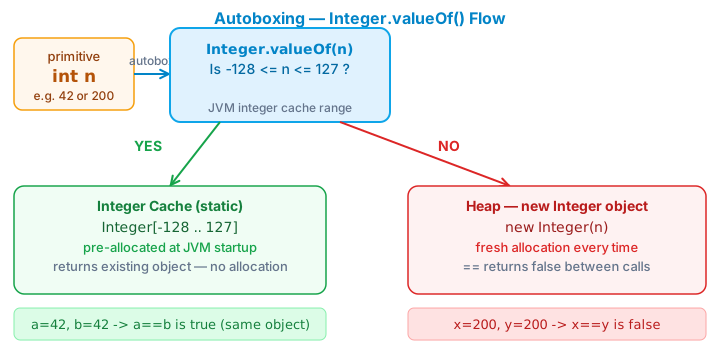
The JVM pre-caches Integer objects for values -128 to 127 at startup.
Integer a = 127;
Integer b = 127;
System.out.println(a == b); // true — same cached object

Integer c = 128;
Integer d = 128;
System.out.println(c == d); // false — two different Heap objects
This range was chosen because these values are the most common in practice: array indices, counters, flags. It is a JDK performance optimization, not a language feature.
The cache upper bound is configurable
You can extend the cache with: -XX:AutoBoxCacheMax=<n>
For example, -XX:AutoBoxCacheMax=256 caches up to 256.
Rule
Never use == to compare Integer, Long, or Double. Always use .equals().
9. Autoboxing & Unboxing
Collections like ArrayList only accept objects, not primitives. Java bridges this gap
with autoboxing — automatic conversion between primitives and their wrapper classes:
| Primitive | Wrapper |
|---|---|
int |
Integer |
long |
Long |
double |
Double |
boolean |
Boolean |
List<Integer> numbers = new ArrayList<>();
numbers.add(42);        // Java calls Integer.valueOf(42)
int n = numbers.get(0); // Java calls intValue()
Autoboxing is convenient but carries serious hidden costs in large loops:
// BAD — creates 1 million Long objects needlessly
Long sum = 0L;
for (long i = 0; i < 1_000_000; i++) {
    sum += i; // unbox → compute → box → assign
}

// GOOD — pure primitives, no objects created
long sum = 0L;
for (long i = 0; i < 1_000_000; i++) {
    sum += i;
}
The bad version is roughly 6× slower and creates unnecessary GC pressure (Effective Java, Item 61).
10. Code example
Verified
Full compilable source: DataTypesDemo.java
11. Common mistakes
Mistake 1 — Using == with Strings
// Wrong — compares addresses, not content
if (userInput == "admin") { ... }

// Correct — put literal first to avoid NPE if userInput is null
if ("admin".equals(userInput)) { ... }
Mistake 2 — Using float/double for money
// Wrong
double price = 0.1 + 0.2; // 0.30000000000000004

// Correct
BigDecimal price = new BigDecimal("0.1").add(new BigDecimal("0.2")); // 0.3
Mistake 3 — Forgetting L and f suffixes
long big = 9_999_999_999;   // ❌ compile error — treated as int, overflows
long big = 9_999_999_999L;  // ✅

float f = 3.14;   // ❌ compile error — 3.14 is a double literal
float f = 3.14f;  // ✅
Mistake 4 — Autoboxing in tight loops
Long sum = 0L; // ❌ creates millions of Long objects
for (long i = 0; i < 1_000_000; i++) sum += i;

long sum = 0L; // ✅ pure arithmetic, no boxing
for (long i = 0; i < 1_000_000; i++) sum += i;
Mistake 5 — NullPointerException when unboxing
Integer count = null;
int total = count + 1; // ❌ NPE during unboxing

if (count != null) {
    int total = count + 1; // ✅
}
Mistake 6 — Using an uninitialized local variable
int total;
System.out.println(total); // ❌ compile error: variable total might not have been initialized

int total = 0;             // ✅
System.out.println(total);
12. Interview questions
Q1: What is the core difference between primitive and reference types?
Primitives store their actual value directly on the Stack — no indirection, no GC overhead, cannot be null. References store the address of an object on the Heap — managed by GC, can be null, support polymorphism.
Q2: Why does Integer a = 128; Integer b = 128; a == b return false?
JVM caches
Integerfrom -128 to 127. For 128, autoboxing callsInteger.valueOf(128)— which creates a new Heap object instead of returning a cached one. So==compares two different addresses → false. Always use.equals()to compare wrapper type values.
Q3: What does String immutability mean in practice?
Once created, a String's content never changes. Operations like
concat,toUpperCase, andreplaceall return new String objects — the original is unaffected. Immutability enables the String Pool to work safely and makes String inherently thread-safe.
Q4: When should you use StringBuilder instead of +?
Each
+creates a new String object. In a loop of n iterations, this produces O(n²) memory overhead.StringBuilderuses an internal resizable buffer — O(n) overall. Rule: use+when concatenating a few strings in one statement; useStringBuilderin loops.
Q5: When must you use Integer instead of int?
When storing in a Collection, using as a generic type parameter, needing null to represent "no value", or needing utility methods like
Integer.parseInt()orInteger.toBinaryString().
Q6: Is var dynamic typing? How is it different from JavaScript's var?
No. Java's
varis local variable type inference at compile time. The compiler infers the type from the right-hand side and locks it in —var x = 10; x = "hello"is a compile error. Java remains statically typed. JavaScript'svaris dynamic — fundamentally different.
Q7: How does a local variable differ from an instance variable?
A local variable is declared inside a method, lives only within that block's scope, and must be explicitly initialized before use. An instance variable is declared in the class body, lives for the entire lifetime of the object, and is automatically given a default value if not initialized (
0for numeric types,falsefor boolean,nullfor reference types).
13. Further reading
| Resource | What to read |
|---|---|
| Effective Java — Joshua Bloch | Item 6: Avoid unnecessary objects · Item 61: Prefer primitives to boxed primitives |
| JLS Section 4 — Types, Values, Variables | Language specification |
| JEP 507 — Primitive Types in Patterns | Java 25 preview: primitives in pattern matching |
| JEP 286 — Local Variable Type Inference | var — design and limitations |
| Java Performance — Scott Oaks | Chapter 4: Working with the JVM |
| Oracle Java Tutorial — Data Types | Primitive Data Types |