Operators¶
1. What is it¶
An operator is a symbol or keyword that instructs the JVM to perform a computation on one or more operands and return a result.
| Group | Operators | Returns |
|---|---|---|
| Arithmetic | + - * / % ++ -- |
Number |
| Assignment | = += -= *= /= %= … |
Assigned value |
| Comparison | == != < > <= >= |
boolean |
| Logical | && \|\| ! |
boolean |
| Bitwise | & \| ^ ~ << >> >>> |
Integer |
| Ternary | ? : |
Value of selected branch |
| Type | instanceof |
boolean |
2. Why it matters¶
Operators are the foundation of every Java expression. Understanding them explains:
- Why
5 / 2returns2, not2.5 - Why
i++and++iproduce different results in the same expression - Why using
&instead of&&can cause aNullPointerException - Why
intoverflow happens silently without any error
These are also among the most common topics in Junior-level technical screening tests.
3. Arithmetic Operators¶
| Operator | Meaning | Example (a=10, b=3) |
Result |
|---|---|---|---|
+ |
Addition | a + b |
13 |
- |
Subtraction | a - b |
7 |
* |
Multiplication | a * b |
30 |
/ |
Division | a / b |
3 (not 3.33) |
% |
Modulo | a % b |
1 |
++ |
Increment by 1 | a++ / ++a |
See below |
-- |
Decrement by 1 | a-- / --a |
See below |
Integer division¶
When both operands are int or long, Java truncates the fractional part — it does not round:
System.out.println(5 / 2);     // 2  — not 2.5
System.out.println(-7 / 2);    // -3 — truncates toward zero
System.out.println(7 % 2);     // 1
System.out.println(-7 % 2);    // -1 — sign follows the dividend

// To get a decimal result: cast one operand to double
System.out.println((double) 5 / 2); // 2.5
Prefix (++i) vs Postfix (i++)¶
int i = 5;

// Postfix — returns the OLD value, then increments
System.out.println(i++); // prints 5, then i becomes 6

// Prefix — increments FIRST, then returns the new value
System.out.println(++i); // i becomes 7, prints 7
Best practice
Do not use ++/-- inside a larger expression — it is confusing and error-prone.
Use them on their own line: i++; or ++i;
4. Assignment Operators¶
Compound assignment operators (+=, -=, …) are not just shorthand — they also insert an implicit cast back to the left-hand type:
// Basic assignment
int x = 10;

// Compound assignment — equivalent to x = (int)(x + 5)
x += 5;   // 15
x -= 3;   // 12
x *= 2;   // 24
x /= 4;   // 6
x %= 4;   // 2
// Implicit narrowing cast in compound assignment
byte b = 10;
b += 5;   // ✅ valid — compiler inserts (byte) cast automatically
// b = b + 5; // ❌ compile error — b + 5 is int, cannot assign to byte without cast
5. Comparison Operators¶
Always return boolean. Used in if conditions, loops, and ternary expressions.
| Operator | Meaning | Example | Result |
|---|---|---|---|
== |
Equal to | 5 == 5 |
true |
!= |
Not equal to | 5 != 3 |
true |
< |
Less than | 3 < 5 |
true |
> |
Greater than | 5 > 3 |
true |
<= |
Less than or equal | 5 <= 5 |
true |
>= |
Greater than or equal | 4 >= 5 |
false |
== on objects compares addresses, not content
This is the source of many subtle bugs. See lesson 02 (Variables & Data Types) for the full explanation.
String s1 = new String("Java");
String s2 = new String("Java");
System.out.println(s1 == s2);      // false — two different addresses on the Heap
System.out.println(s1.equals(s2)); // true  — same content
6. Logical Operators¶
Short-circuit: && and ||¶
&& and || use short-circuit evaluation — the right side is not evaluated if the result is already determined from the left side:
// && — if left is false, right side is skipped entirely
if (list != null && list.size() > 0) {
    // Safe: if list == null, list.size() is never called
}

// || — if left is true, right side is skipped entirely
if (isAdmin || hasPermission(user)) {
    // If isAdmin is true, hasPermission() is never called
}
Non-short-circuit: & and |¶
& and | always evaluate both sides — no short-circuit:
String str = null;

// Dangerous — causes NPE even though str == null
if (str != null & str.length() > 0) { ... }

// Safe — str.length() is never called if str == null
if (str != null && str.length() > 0) { ... }
Rule
Always use && and || for logical conditions. Reserve & and | for bitwise arithmetic.
Negation !¶
boolean isActive = true;
System.out.println(!isActive);       // false
System.out.println(!(5 > 3));        // false
System.out.println(!list.isEmpty()); // true if list has elements
7. Bitwise Operators¶
Operate directly on the individual bits of integers. Common in permission systems, encoding, and performance-sensitive low-level code.
| Operator | Name | Example | Result |
|---|---|---|---|
& |
AND | 0b1010 & 0b1100 |
0b1000 (8) |
\| |
OR | 0b1010 \| 0b1100 |
0b1110 (14) |
^ |
XOR | 0b1010 ^ 0b1100 |
0b0110 (6) |
~ |
NOT (complement) | ~5 |
-6 |
<< |
Left shift | 1 << 3 |
8 (multiply by 2³) |
>> |
Signed right shift | 16 >> 2 |
4 (divide by 2²) |
>>> |
Unsigned right shift | -1 >>> 28 |
15 |
// Practical example — bit flags for permissions
int READ    = 0b001; // 1
int WRITE   = 0b010; // 2
int EXECUTE = 0b100; // 4

int userPermission = READ | WRITE; // 0b011 = 3

boolean canRead    = (userPermission & READ)    != 0; // true
boolean canExecute = (userPermission & EXECUTE) != 0; // false
>> vs >>>
>> preserves the sign bit — negative numbers stay negative after shifting.
>>> fills the high bit with 0 regardless of sign — used for treating data as raw bits.
8. Ternary Operator¶
Syntax: condition ? value_if_true : value_if_false
int a = 10, b = 20;
int max   = (a > b) ? a : b;           // 20
String label = (max > 15) ? "big" : "small"; // "big"
Use the ternary for simple, single-line decisions. Do not nest — it destroys readability:
// ❌ Hard to read — use if/else instead
String grade = score >= 90 ? "A" : score >= 70 ? "B" : score >= 50 ? "C" : "F";

// ✅ Clear and maintainable
String grade;
if      (score >= 90) grade = "A";
else if (score >= 70) grade = "B";
else if (score >= 50) grade = "C";
else                  grade = "F";
9. instanceof and Pattern Matching (Java 16+)¶
instanceof checks whether an object is an instance of a given type.
Classic syntax (before Java 16)¶
Object obj = "Hello Java";

if (obj instanceof String) {
    String s = (String) obj; // manual cast required
    System.out.println(s.toUpperCase());
}
Pattern Matching (Java 16+, JEP 394)¶
Combines the type check and variable declaration into a single step — s is scoped to the if block (preview Java 14–15 via JEP 305/375, finalized Java 16 via JEP 394):
if (obj instanceof String s) {
    System.out.println(s.toUpperCase()); // s is already typed — no cast needed
}
Pattern matching works naturally with switch (Java 21+):
Object shape = new Circle(5.0);

String desc = switch (shape) {
    case Circle c    -> "Circle with radius " + c.radius();
    case Rectangle r -> "Rectangle " + r.width() + "x" + r.height();
    default          -> "Unknown shape";
};
10. Operator Precedence¶
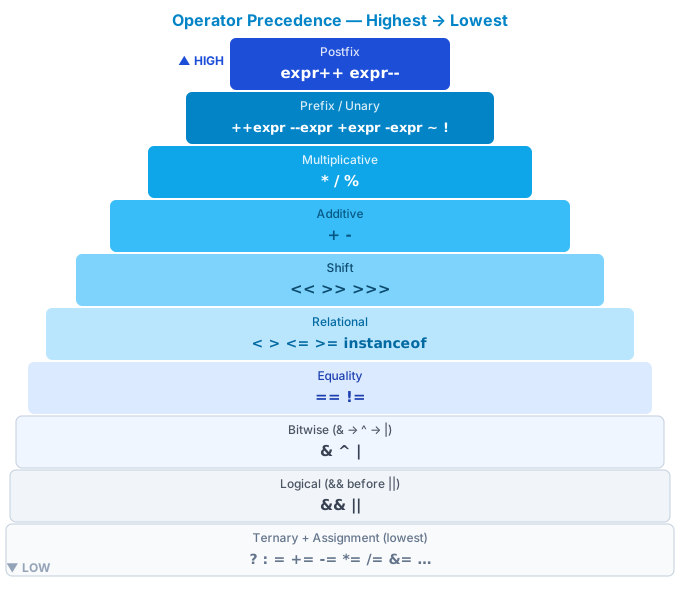
When an expression contains multiple operators, Java applies precedence rules (highest to lowest):
| Level | Operators | Note |
|---|---|---|
| 1 (highest) | expr++ expr-- |
Postfix |
| 2 | ++expr --expr +expr -expr ~ ! |
Prefix / Unary |
| 3 | * / % |
Multiplicative |
| 4 | + - |
Additive |
| 5 | << >> >>> |
Shift |
| 6 | < > <= >= instanceof |
Relational |
| 7 | == != |
Equality |
| 8 | & |
Bitwise AND |
| 9 | ^ |
Bitwise XOR |
| 10 | \| |
Bitwise OR |
| 11 | && |
Logical AND |
| 12 | \|\| |
Logical OR |
| 13 | ? : |
Ternary |
| 14 (lowest) | = += -= … |
Assignment |
// Without parentheses — easy to misread
int result = 2 + 3 * 4; // 14, not 20 (multiplication first)

// With parentheses — explicit intent
int result = (2 + 3) * 4; // 20
Best practice
When in doubt about precedence, add parentheses. Clear code matters more than concise code.
11. Code example¶
Verified
Full compilable source: OperatorsDemo.java
12. Common mistakes¶
Mistake 1 — Integer division when a decimal result is needed¶
int a = 5, b = 2;
double result = a / b;          // ❌ 2.0 — integer division happens first

double result = (double) a / b; // ✅ 2.5
double result = a / (double) b; // ✅ 2.5
double result = 1.0 * a / b;   // ✅ 2.5
Mistake 2 — Wrong ++ position in an expression¶
int i = 5;
int result = i++ * 2; // ❌ intended 6*2=12 but got 5*2=10
                      // because i++ returns 5 before incrementing

// Write it on a separate line — clear and correct
i++;
int result = i * 2;   // ✅ 12
Mistake 3 — Using & instead of && for logical conditions¶
String s = null;

// ❌ NPE — & does not short-circuit, s.isEmpty() is called even when s == null
if (s != null & s.isEmpty()) { ... }

// ✅ Safe
if (s != null && s.isEmpty()) { ... }
Mistake 4 — Ignoring int overflow¶
int a = 2_000_000_000;
int b = 2_000_000_000;
int sum = a + b; // ❌ silent overflow — result is -294967296

long sum = (long) a + b; // ✅ cast before adding
Mistake 5 — Misreading operator precedence¶
boolean result = 2 + 3 == 5 && 10 / 2 == 5; // true — clear if you know precedence
boolean tricky = true || false && false;      // true — && is evaluated before ||

// Always use parentheses to make intent explicit
boolean clear = true || (false && false);     // ✅
13. Interview questions¶
Q1: What does 5 / 2 return in Java, and why?
2. When both operands are integer types (int,long), Java performs integer division — the fractional part is truncated toward zero. To get2.5, cast one side:(double) 5 / 2.
Q2: What is the difference between && and & in Java?
&&is a logical AND with short-circuit evaluation: if the left side isfalse, the right side is never evaluated.&is bitwise AND (and also non-short-circuit logical AND): always evaluates both sides. Using&for logic can cause aNullPointerExceptionif the right side accesses a null reference.
Q3: How do i++ and ++i differ?
Both increment
iby 1, but they differ in the value they return:i++(postfix) returns the original value before incrementing.++i(prefix) returns the new value after incrementing. The difference only matters when used inside a larger expression.
Q4: What is the benefit of instanceof pattern matching (Java 16+)?
It combines the type check and variable binding into one step, eliminating a manual cast and reducing the risk of
ClassCastException.if (obj instanceof String s)— if the check passes,sis immediately usable as aString. (Feature history: preview Java 14–15, JEP 305/375; finalized Java 16, JEP 394.)
Q5: What is the difference between >> and >>>?
>>is a signed right shift: the sign bit is copied into the high bit — negative numbers stay negative.>>>is an unsigned right shift:0is always filled into the high bit — the result is always non-negative. Example:-8 >> 1 = -4, but-8 >>> 1 = 2147483644.
Q6: What happens when int overflows in Java?
Java does not throw an exception — the result silently wraps around using modulo 2³² arithmetic.
Integer.MAX_VALUE + 1 = Integer.MIN_VALUE. Uselongfor larger values, orMath.addExact()if you need overflow detection.
14. Further reading¶
| Resource | What to read |
|---|---|
| JLS §15 — Expressions | Operator specification and precedence rules |
| JEP 394 — Pattern Matching for instanceof | Pattern matching (Java 16) |
| JEP 441 — Pattern Matching for switch | Switch pattern matching (Java 21) |
| Effective Java — Joshua Bloch | Item 31: Prefer primitive types · Item 49: Check parameters |
| Oracle Java Tutorial — Operators | Official operator guide |