Arrays — 1D & 2D¶
1. What is it¶
An array is a data structure that stores a sequence of elements of the same type, with a fixed size, indexed from 0.
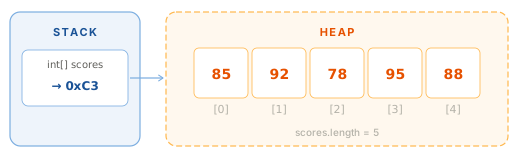
Three core characteristics:
- Fixed-size — size is set at creation and cannot change afterwards
- Zero-indexed — first element at index
0, last at indexlength - 1 - Heap-allocated — the Stack variable holds only a reference (address); the actual data lives on the Heap
2. Why it matters¶
Arrays are the foundation of every data structure in Java:
ArrayListinternally uses anObject[]to store elementsHashMapinternally is an array of buckets- Sorting and searching algorithms all start with arrays
- Common interview patterns: two-pointer, sliding window, prefix sum — all on arrays
3. Declaration and initialization¶
Three ways to declare a 1D array¶
// Way 1 — allocate only, no values yet (uses default values)
int[] scores = new int[5]; // [0, 0, 0, 0, 0]

// Way 2 — declare + initialize with values (most common)
int[] scores = {85, 92, 78, 95, 88};

// Way 3 — new + initializer (useful when passing directly to a method)
printArray(new int[]{85, 92, 78, 95, 88});
Default values when using new¶
| Type | Default value |
|---|---|
int, long, short, byte |
0 |
double, float |
0.0 |
boolean |
false |
char |
' ' |
Object (String, ...) |
null |
int[] arr = new int[3];
System.out.println(arr[0]); // 0

String[] names = new String[3];
System.out.println(names[0]); // null
Accessing elements and properties¶
int[] scores = {85, 92, 78, 95, 88};

System.out.println(scores[0]);     // 85 — first element
System.out.println(scores[4]);     // 88 — last element
System.out.println(scores.length); // 5 — field, no parentheses
scores[2] = 80;                    // reassign a value
.length is a field, not a method
arr.length — no parentheses (). Unlike String.length() or List.size(). A common mistake when starting out.
4. Iterating over an array¶
5. Common operations¶
Sum and average¶
int[] scores = {85, 92, 78, 95, 88};
int sum = 0;

for (int s : scores) sum += s;

double avg = (double) sum / scores.length;
System.out.println("Sum: " + sum);     // 438
System.out.println("Average: " + avg); // 87.6
Find min / max¶
int[] scores = {85, 92, 78, 95, 88};
int min = scores[0], max = scores[0];

for (int i = 1; i < scores.length; i++) {
    if (scores[i] < min) min = scores[i];
    if (scores[i] > max) max = scores[i];
}
System.out.println("Min: " + min + ", Max: " + max); // Min: 78, Max: 95
Copying an array¶
int[] original = {1, 2, 3, 4, 5};

// Arrays.copyOf — simplest
int[] copy1 = Arrays.copyOf(original, original.length);

// Arrays.copyOfRange — copy a range [fromIndex, toIndex)
int[] copy2 = Arrays.copyOfRange(original, 1, 4); // [2, 3, 4]

// System.arraycopy — fastest, maximum control
int[] copy3 = new int[original.length];
System.arraycopy(original, 0, copy3, 0, original.length);
Never copy an array with =
6. 2D arrays¶
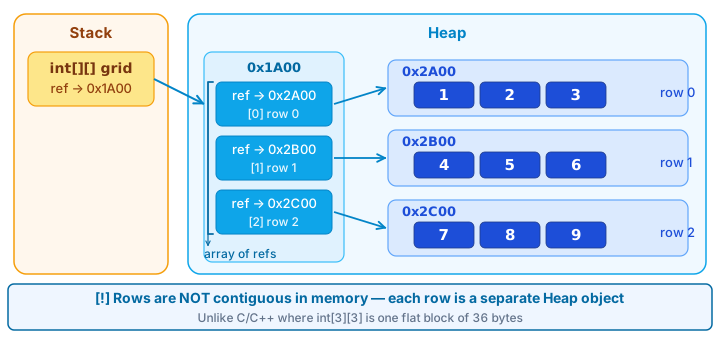
A 2D array is an array of arrays — used to represent matrices, tables, or grids.
// Declaration + allocation
int[][] matrix = new int[3][4]; // 3 rows, 4 columns, default 0

// Declaration + initialization
int[][] grid = {
    {1, 2, 3},
    {4, 5, 6},
    {7, 8, 9}
};

// Access: [row][column]
System.out.println(grid[1][2]); // 6

System.out.println(grid.length);    // 3 — number of rows
System.out.println(grid[0].length); // 3 — columns in row 0
Iterating over a 2D array¶
Jagged arrays — rows of different lengths
Java allows each row of a 2D array to have a different length:
int[][] triangle = new int[4][];
for (int i = 0; i < triangle.length; i++) {
    triangle[i] = new int[i + 1];
}
// row 0: [0]
// row 1: [0, 0]
// row 2: [0, 0, 0]
// row 3: [0, 0, 0, 0]
Unlike C/C++, a Java 2D array is not a contiguous block of memory — it is an array of references to separate row arrays.
7. java.util.Arrays¶
Arrays is a utility class with the most commonly needed array operations — requires import java.util.Arrays.
int[] arr = {5, 2, 8, 1, 9, 3};

// Sort in place
Arrays.sort(arr);
System.out.println(Arrays.toString(arr)); // [1, 2, 3, 5, 8, 9]

// Binary search — array must already be sorted
int idx = Arrays.binarySearch(arr, 5);    // 3

// Fill
int[] filled = new int[5];
Arrays.fill(filled, 7);                   // [7, 7, 7, 7, 7]

// Copy
int[] copy  = Arrays.copyOf(arr, 4);           // [1, 2, 3, 5]
int[] range = Arrays.copyOfRange(arr, 2, 5);   // [3, 5, 8]

// Compare content
int[] a = {1, 2, 3}, b = {1, 2, 3};
System.out.println(Arrays.equals(a, b));       // true
System.out.println(a == b);                    // false — different addresses

// 2D arrays
int[][] x = {{1, 2}, {3, 4}};
int[][] y = {{1, 2}, {3, 4}};
System.out.println(Arrays.deepEquals(x, y));   // true
System.out.println(Arrays.deepToString(x));    // [[1, 2], [3, 4]]
8. Array vs ArrayList¶
int[] / String[] |
ArrayList<Integer> |
|
|---|---|---|
| Size | Fixed | Dynamic, auto-grows |
| Element types | Primitive + Object | Object only (autoboxing) |
| Performance | Higher | Boxed type overhead |
| API | Minimal (Arrays.*) |
Rich (add, remove, contains...) |
| Use when | Size known upfront, performance matters | Size unknown, frequent add/remove |
Rule of thumb
If you know the size and don't need to add/remove elements → use an array. Otherwise → ArrayList. Phase 02 covers the full Java Collections Framework.
9. Code example¶
Verified
Full compilable source: ArraysDemo.java
- Cast
sum(arr)todoublebefore dividing — without the cast, integer division truncates the decimal, returning87instead of87.6. twoSumis LeetCode #1 — the first problem most people attempt. Understanding arrays and nested loops is enough to solve it in O(n²). A hash map gives O(n) — covered in Phase 02.
10. Common mistakes¶
Mistake 1 — ArrayIndexOutOfBoundsException¶
int[] arr = {1, 2, 3}; // length = 3, valid indices: 0, 1, 2

System.out.println(arr[3]); // ❌ ArrayIndexOutOfBoundsException: index 3 out of bounds for length 3

System.out.println(arr[arr.length - 1]); // ✅ last element is always at length - 1
Mistake 2 — NullPointerException with Object arrays¶
String[] names = new String[3]; // [null, null, null]

System.out.println(names[0].length()); // ❌ NullPointerException

if (names[0] != null) {                // ✅ check before use
    System.out.println(names[0].length());
}
Mistake 3 — Comparing arrays with ==¶
int[] a = {1, 2, 3};
int[] b = {1, 2, 3};

System.out.println(a == b);              // false — compares memory addresses
System.out.println(Arrays.equals(a, b)); // true ✅

int[][] x = {{1, 2}, {3, 4}};
int[][] y = {{1, 2}, {3, 4}};
System.out.println(Arrays.deepEquals(x, y)); // true ✅ — must use deepEquals for 2D
Mistake 4 — Assignment = mistaken for a copy¶
int[] original = {1, 2, 3};
int[] alias = original;                    // ❌ same reference
int[] copy   = Arrays.copyOf(original, 3); // ✅ real copy

alias[0] = 99;
System.out.println(original[0]); // 99 — modified!
copy[0]  = 77;
System.out.println(original[0]); // still 99 — safe ✅
Mistake 5 — Printing an array directly¶
int[] arr = {1, 2, 3};
System.out.println(arr);                   // ❌ [I@6d06d69c — memory address
System.out.println(Arrays.toString(arr));  // ✅ [1, 2, 3]

int[][] m = {{1, 2}, {3, 4}};
System.out.println(Arrays.toString(m));     // ❌ [[I@..., [I@...]
System.out.println(Arrays.deepToString(m)); // ✅ [[1, 2], [3, 4]]
11. Interview questions¶
Q1: What is the difference between Array and ArrayList?
An array has fixed size, can hold primitives, and has higher performance.
ArrayListis dynamically sized, holds only Objects (autoboxing for primitives), and has a richer API. Use an array when size is known upfront and add/remove is not needed; useArrayListfor flexibility.
Q2: How do you properly copy an array? What is a shallow copy?
Use
Arrays.copyOf(),Arrays.copyOfRange(), orSystem.arraycopy(). Assignmentb = ais not a copy — it creates another reference pointing to the same array. Note: all the above methods produce a shallow copy — if the array contains Objects, only references are copied, not the objects themselves.
Q3: What are the default values when an array is created with new?
Numerics →
0/0.0.boolean→false.char→' '. Object references →null. Java always initializes array elements on allocation — there are no "garbage values" like in C/C++.
Q4: Why can't you use Arrays.equals() for 2D arrays?
Arrays.equals()only compares one level — it compares the elements of the outer array, which areint[]references. Two different references pointing to arrays with the same content still returnfalse. You must useArrays.deepEquals()for recursive comparison.
Q5: What prerequisite does Arrays.binarySearch() require?
The array must be sorted in ascending order before calling it. If not sorted, the result is undefined. Typically combine
Arrays.sort()first, thenbinarySearch().
12. References¶
| Resource | Content |
|---|---|
| JLS §10 — Arrays | Official specification |
| java.util.Arrays Javadoc | Full API reference |
| Oracle Tutorial — Arrays | Official tutorial |
| Effective Java — Joshua Bloch | Item 28: Prefer lists to arrays (why generics and arrays don't mix) |