String and StringBuilder¶
1. What is it¶
String in Java is an immutable sequence of characters. Once created, its content cannot change — every "modification" produces a new object.
String name = "Java";
name = name + " 21"; // does not modify "Java" — creates a new object "Java 21"
StringBuilder is the mutable counterpart — use it when you need to build a string incrementally inside a loop or by joining many parts.
2. Why it matters¶
Strings appear everywhere in real-world applications: usernames, URLs, JSON, log messages, SQL queries... Understanding String correctly helps you:
- Avoid the classic
==vs.equals()comparison bug - Avoid creating thousands of throwaway objects when concatenating in a loop
- Understand why String is safe as a
HashMapkey - Answer interview questions about immutability and the String Pool
3. String literal and the String Pool¶
Java has a special region in the Heap called the String Pool — it caches String literals for reuse.
String s1 = "Hello";            // creates "Hello" in the pool
String s2 = "Hello";            // reuses the existing object
String s3 = new String("Hello"); // forces a new object outside the pool
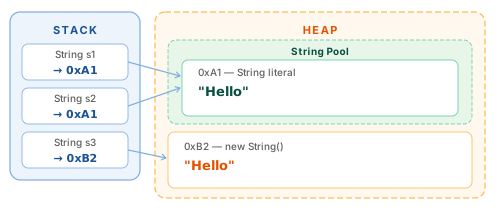
System.out.println(s1 == s2);       // true  — same address (same object in pool)
System.out.println(s1 == s3);       // false — s3 is a different object
System.out.println(s1.equals(s3));  // true  — same content
Always use .equals() to compare String content
== compares memory addresses, not content. Only use == when you intentionally want to check whether two variables point to the exact same object — which is very rare in practice.
4. String is immutable¶
Immutable means the object's state cannot change after creation. Every method that appears to "modify" a String actually returns a new object.
String s = "hello";
s.toUpperCase();           // ❌ does nothing to s — the result is discarded
System.out.println(s);    // hello — s is unchanged

String upper = s.toUpperCase(); // ✅ assign the result to a new variable
System.out.println(upper); // HELLO
Why did Java make String immutable?¶
- HashMap / HashSet safety — the hash code is computed once and never changes
- Thread safety — immutable objects are inherently thread-safe with no synchronization needed
- Security — passwords, file paths, and class names cannot be altered after being verified
- String Pool — only possible when shared objects are guaranteed never to change
5. Common methods¶
String s = "Hello, Java World";

s.length()             // 17
s.charAt(7)            // 'J'
s.indexOf('o')         // 4  — first occurrence
s.lastIndexOf('o')     // 14 — last occurrence
s.indexOf("Java")      // 7
s.contains("Java")     // true
s.startsWith("Hello")  // true
s.endsWith("World")    // true
s.isEmpty()            // false (length > 0)
s.isBlank()            // false (Java 11 — also detects whitespace-only strings)
String s = "  Hello, Java!  ";

s.toLowerCase()            // "  hello, java!  "
s.toUpperCase()            // "  HELLO, JAVA!  "
s.trim()                   // "Hello, Java!"  — strips ASCII whitespace
s.strip()                  // "Hello, Java!"  — (Java 11) Unicode-aware, prefer over trim
s.stripLeading()           // "Hello, Java!  "
s.stripTrailing()          // "  Hello, Java!"
s.replace('l', 'r')        // "  Herro, Java!  "
s.replace("Java", "World") // "  Hello, World!  "
s.replaceAll("\\s+", "_")  // replaces any whitespace sequence with _  (regex)
"ha".repeat(3)             // "hahaha" — Java 11+
String s = "Hello, Java World";

s.substring(7)         // "Java World" — from index 7 to end
s.substring(7, 11)     // "Java"       — [7, 11)

String csv = "a,b,c,d";
String[] parts = csv.split(",");    // ["a", "b", "c", "d"]
String[] two   = csv.split(",", 2); // ["a", "b,c,d"] — at most 2 parts
split() takes a regex, not plain text
"1.2.3".split(".") returns an empty array because . in regex means "any character".
Use split("\\.") to split on a literal dot.
// String ↔ char array
char[] chars = "Hello".toCharArray();  // ['H','e','l','l','o']
String back  = new String(chars);       // "Hello"

// Primitive → String
String n = String.valueOf(42);          // "42"
String d = String.valueOf(3.14);        // "3.14"

// String → primitive
int    i = Integer.parseInt("42");      // 42
double x = Double.parseDouble("3.14"); // 3.14

// Formatting
String msg = String.format("Hello %s, you are %d years old", "An", 25);
// "Hello An, you are 25 years old"

// Text block — Java 15+ (multiline strings)
String json = """
        {
          "name": "An",
          "age": 25
        }
        """;

// Join with delimiter
String joined = String.join(", ", "An", "Binh", "Chi"); // "An, Binh, Chi"
6. Concatenation and performance¶
The problem with + inside a loop¶
// ❌ O(n²) — each + creates a new String object
String result = "";
for (int i = 0; i < 10_000; i++) {
    result += i; // creates 10,000 intermediate String objects
}

// ✅ O(n) — StringBuilder modifies content in-place
StringBuilder sb = new StringBuilder();
for (int i = 0; i < 10_000; i++) {
    sb.append(i);
}
String result = sb.toString();
The compiler optimises simple + expressions
For a single-line expression like "Hello " + name + "!", the Java compiler automatically uses StringBuilder under the hood. But when + is inside a loop, the compiler cannot optimise — you must use StringBuilder yourself.
7. StringBuilder¶
StringBuilder lets you modify a string in-place without creating a new object on every change.
StringBuilder sb = new StringBuilder();

sb.append("Hello");              // "Hello"
sb.append(", ").append("Java");  // "Hello, Java"  — chaining
sb.insert(5, " World");          // "Hello World, Java"
sb.delete(5, 11);                // "Hello, Java"
sb.replace(7, 11, "World");      // "Hello, World"
sb.reverse();                    // "dlroW ,olleH"
sb.reverse();                    // "Hello, World"

System.out.println(sb.length());    // 12
System.out.println(sb.charAt(0));   // 'H'
System.out.println(sb.toString());  // "Hello, World"
StringBuilder vs StringBuffer¶
StringBuilder |
StringBuffer |
|
|---|---|---|
| Thread-safe | No | Yes (synchronized) |
| Speed | Faster | Slower |
| Use when | Single-threaded (99 % of the time) | Multi-threaded shared mutation |
In practice,
StringBufferis almost never needed. Default toStringBuilder— if thread safety is required, there are usually better approaches than sharing a mutable string across threads.
8. Code example¶
Verified
Full compilable source: StringDemo.java
replaceAll("[^a-z0-9]", "")removes every character that is not a letter or digit — a basic regex pattern worth memorising.- Using
StringBuilderinstead of+in a loop avoids creating O(n) intermediate String objects. indexOf(word, fromIndex)— the two-argument overload starts the search atfromIndex, so each call moves forward instead of scanning from the beginning again.
9. Common mistakes¶
Mistake 1 — Comparing Strings with ==¶
String a = new String("Java");
String b = new String("Java");

if (a == b) { ... }       // ❌ false — compares addresses
if (a.equals(b)) { ... }  // ✅ true  — compares content

// Avoid NullPointerException when a may be null
if ("Java".equals(a)) { ... } // ✅ put the literal first
Mistake 2 — Ignoring the return value of String methods¶
String s = "  hello  ";
s.trim();                    // ❌ result is discarded, s is unchanged
System.out.println(s);       // "  hello  "

s = s.trim();                // ✅ reassign
System.out.println(s);       // "hello"
Mistake 3 — Concatenating in a loop with +¶
// ❌ Creates thousands of intermediate String objects
String result = "";
for (String word : words) result += word + " ";

// ✅ StringBuilder
StringBuilder sb = new StringBuilder();
for (String word : words) sb.append(word).append(' ');
String result = sb.toString();
Mistake 4 — StringIndexOutOfBoundsException with substring¶
String s = "Hello"; // length = 5

s.substring(3, 10); // ❌ end index 10 > length 5

s.substring(3, s.length()); // ✅ safe
s.substring(3);              // ✅ equivalent, shorter
Mistake 5 — NullPointerException when String is null¶
String name = null;

name.equals("Admin");           // ❌ NullPointerException
name.length();                  // ❌ NullPointerException

"Admin".equals(name);           // ✅ false — literal is never null
Objects.equals(name, "Admin");  // ✅ false — null-safe (Java 7+)
10. Interview questions¶
Q1: Why is String immutable in Java?
Three main reasons: (1) String Pool — sharing objects is only safe when they cannot change; (2) Thread safety — immutable objects require no synchronisation; (3) Security — class names, database URLs, and passwords cannot be altered after validation.
Q2: What is the difference between String, StringBuilder, and StringBuffer?
Stringis immutable — every change allocates a new object.StringBuilderis mutable, modifies in-place, not thread-safe, faster.StringBufferis identical toStringBuilderbut all methods aresynchronized— thread-safe but slower. In practice: useStringfor fixed values,StringBuilderwhen building or modifying strings,StringBufferalmost never.
Q3: What is the String Pool? What does intern() do?
The String Pool is a cache inside the Heap — JVM reuses literal String objects instead of allocating a new one each time.
intern()places a String (typically created withnew) into the pool and returns the pool reference. Rarely used directly in modern Java.
Q4: Why is + inside a large loop a performance problem?
Because String is immutable, every
+allocates a new String. Over n iterations, Java creates strings of length 1, 2, 3… n — copying 1+2+…+n = O(n²) characters total.StringBuildermaintains a resizable buffer with amortised O(1) perappend, giving O(n) overall.
Q5: When should you use compareTo() instead of equals()?
equals()answers "are these equal?" — use it for equality checks.compareTo()answers "which comes first?" — use it when you need to sort strings or establish an ordering (e.g. inside a customComparator, or to checka.compareTo(b) < 0to see ifacomes beforebalphabetically).
11. References¶
| Resource | Content |
|---|---|
| JLS §4.3.3 — The String Type | Official specification |
| java.lang.String Javadoc | Full API reference |
| java.lang.StringBuilder Javadoc | Full API reference |
| Oracle — Text Blocks | Text Blocks (Java 15+) |
| Effective Java — Joshua Bloch | Item 63: Beware the performance of string concatenation |