Loops — for / while / do-while / for-each¶
1. What is it¶
A loop executes a block of code repeatedly without writing it multiple times. Instead of:
Write it in 3 lines:
Java provides four types of loops, each suited to a different situation:
| Type | Use when |
|---|---|
for |
Number of iterations is known upfront |
while |
Loop until a condition is false, check before |
do-while |
Execute at least once, check after |
for-each |
Iterate over every element of an array / collection |
2. Why it matters¶
Loops appear in every real-world application: processing lists, searching, aggregating data, reading files. Understanding them helps you:
- Choose the right loop type for each problem
- Avoid infinite loops — the program hangs
- Avoid off-by-one errors — the classic boundary mistake
- Understand performance: index access in a
LinkedListloop is O(n²), not O(n)
3. The for loop¶
Use when the number of iterations is known upfront. The syntax has three parts separated by ;:
Execution flow:
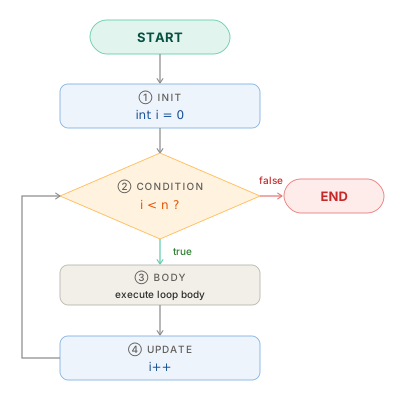
All three parts are optional — omitting all three produces an infinite loop:
Counting down¶
Custom step size¶
Two counters at once¶
// Reverse an array in-place
for (int i = 0, j = arr.length - 1; i < j; i++, j--) {
    int temp = arr[i];
    arr[i] = arr[j];
    arr[j] = temp;
}
4. The while loop¶
Use when the number of iterations is not known upfront. Condition is checked before the body executes:
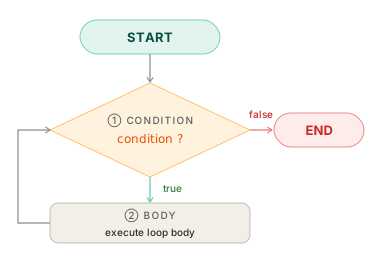
// Count the digits in an integer
int n = 12345;
int count = 0;

while (n > 0) {
    n /= 10;
    count++;
}
System.out.println(count); // 5
// Read input until -1
Scanner scanner = new Scanner(System.in);
int input = scanner.nextInt();

while (input != -1) {
    System.out.println("Received: " + input);
    input = scanner.nextInt();
}
Avoid infinite loops
The condition variable must be updated inside the loop body.
5. The do-while loop¶
Like while, but condition is checked after — the body always executes at least once:
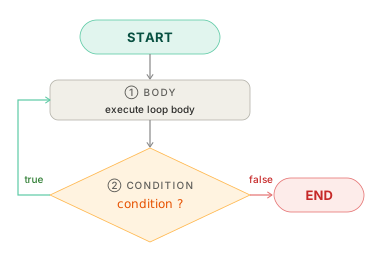
// Show menu, require valid input
int choice;
do {
    System.out.println("1. Add  2. Edit  3. Delete  0. Exit");
    System.out.print("Choose: ");
    choice = scanner.nextInt();
} while (choice < 0 || choice > 3);
When to use do-while
The classic use case: menu-driven input and input validation — when you need to show/execute first, then decide whether to repeat.
In practice, do-while appears far less frequently than for and while.
6. The for-each loop¶
Clean syntax for iterating over every element of an array or any Iterable (List, Set, ...):
// Iterate over array
int[] scores = {85, 92, 78, 95, 88};
int total = 0;

for (int score : scores) {
    total += score;
}
System.out.println("Average: " + total / scores.length); // 87

// Iterate over List
List<String> names = List.of("Alice", "Bob", "Charlie");

for (String name : names) {
    System.out.println("Hello, " + name);
}
Limitations of for-each¶
| Cannot do with for-each | Solution |
|---|---|
| Access the current index | Use traditional for or IntStream.range() |
| Modify elements in an array | Use for with index |
| Iterate in reverse | Use for counting down |
| Remove elements from a List | Use removeIf() or Iterator |
Modifying a collection inside for-each throws ConcurrentModificationException
7. Comparing all four loops¶
Printing 1 to 5 with each loop type:
Best when the iteration count is known. The counter i is scoped to the loop.
Better when the stop condition is more complex than a simple counter. i remains accessible after the loop.
Body executes before the condition is checked. Least commonly used of the four.
8. break and continue¶
break — exit the loop immediately¶
// Find the first element greater than 10
int[] numbers = {3, 7, 12, 5, 18};

for (int n : numbers) {
    if (n > 10) {
        System.out.println("Found: " + n); // 12
        break;
    }
}
continue — skip the current iteration¶
// Print odd numbers from 1 to 10
for (int i = 1; i <= 10; i++) {
    if (i % 2 == 0) continue; // skip even numbers
    System.out.print(i + " "); // 1 3 5 7 9
}
Labeled break — exit a nested loop¶
By default, break only exits the innermost loop. A label lets you break out of an outer one:
int target = 15;

outer:
for (int i = 1; i <= 5; i++) {
    for (int j = 1; j <= 5; j++) {
        if (i * j == target) {
            System.out.println("Found: " + i + " × " + j); // 3 × 5
            break outer; // exits both loops
        }
    }
}
Labeled break in practice
Labeled break is useful but makes control flow harder to follow. In practice, prefer extracting the inner loop into a separate method and using return:
9. Nested loops¶
Each iteration of the outer loop runs the inner loop to completion. Total complexity: O(n × m).
// 3×3 multiplication table
for (int i = 1; i <= 3; i++) {
    for (int j = 1; j <= 3; j++) {
        System.out.printf("%4d", i * j);
    }
    System.out.println();
}
// Output:
//    1   2   3
//    2   4   6
//    3   6   9
// Star triangle
for (int i = 1; i <= 5; i++) {
    for (int j = 1; j <= i; j++) {
        System.out.print("* ");
    }
    System.out.println();
}
// Output:
// *
// * *
// * * *
// * * * *
// * * * * *
Deep nesting is a code smell
Three or more levels of nesting usually signals a need to refactor — extract the inner loop into its own method.
10. Code example¶
Verified
Full compilable source: LoopsDemo.java
- Initialize
maxfrom the first element rather thanInteger.MIN_VALUE— avoids magic constants when unnecessary. - Two counters in one
for:imoves forward,jmoves backward — they meet in the middle. - Early return the moment the target is found — no boolean flag or extra
resultvariable needed. removeIfwith a lambda is cleaner than a manualIteratorand avoidsConcurrentModificationException.
11. Common mistakes¶
Mistake 1 — Off-by-one error¶
int[] arr = {1, 2, 3, 4, 5}; // length = 5, valid indices 0-4

for (int i = 0; i <= arr.length; i++) { // ❌ i <= 5 → arr[5] → ArrayIndexOutOfBoundsException
    System.out.println(arr[i]);
}

for (int i = 0; i < arr.length; i++) {  // ✅ i < 5
    System.out.println(arr[i]);
}
Mistake 2 — Infinite loop¶
int i = 0;
while (i < 5) {
    System.out.println(i);
    // ❌ forgot i++ → loops forever at i = 0
}

for (int j = 1; j > 0; j++) { // ❌ j is always positive and grows → never stops
    // ...
}
Mistake 3 — Modifying a collection inside for-each¶
List<String> list = new ArrayList<>(List.of("a", "b", "c"));

for (String s : list) {
    if (s.equals("b")) list.remove(s); // ❌ ConcurrentModificationException
}

// ✅ Option 1 — removeIf (Java 8+, cleanest)
list.removeIf(s -> s.equals("b"));

// ✅ Option 2 — manual Iterator
Iterator<String> it = list.iterator();
while (it.hasNext()) {
    if (it.next().equals("b")) it.remove();
}
Mistake 4 — Autoboxing in a large loop¶
Long sum = 0L;
for (long i = 0; i < 1_000_000; i++) {
    sum += i; // ❌ unbox → add → create new Long → assign — 1 million garbage objects
}

long sum = 0L;
for (long i = 0; i < 1_000_000; i++) {
    sum += i; // ✅ pure primitives, no objects created
}
Mistake 5 — Index-based access on LinkedList¶
List<String> linked = new LinkedList<>(/* 10,000 elements */);

for (int i = 0; i < linked.size(); i++) {
    System.out.println(linked.get(i)); // ❌ O(n²) — each get(i) traverses from the head
}

for (String s : linked) {
    System.out.println(s); // ✅ O(n) — Iterator moves sequentially
}
12. Interview questions¶
Q1: What is the difference between while and do-while?
whilechecks the condition before the body — the body may never execute if the condition is immediately false.do-whilechecks after — the body always executes at least once, even if the condition is false from the start.
Q2: What is an off-by-one error? How do you avoid it?
A boundary mistake — typically using
<=instead of<with array indices, causingArrayIndexOutOfBoundsException, or the reverse, missing the last element. Avoid it by deriving the boundary directly from the spec: for a 0-indexed array of length n, the condition is alwaysi < length.
Q3: Why can't you modify a collection inside a for-each loop?
for-eachuses an internalIterator. Directly modifying the collection while iterating changes the structural modification count (modCount), which the Iterator detects and responds to by throwingConcurrentModificationException. Fix withremoveIf(), a manual Iterator, or a new list.
Q4: When should you use a traditional for instead of for-each?
When you need: (1) the current index, (2) a custom step size (
i += 2), (3) reverse iteration, or (4) to modify elements in an array. In all other cases, preferfor-each— it's clearer and immune toArrayIndexOutOfBoundsException.
Q5: Why is index-based access on LinkedList a performance problem in a loop?
LinkedList.get(i)must traverse from the head throughinodes — O(i). In a loop of n iterations, that totals O(1 + 2 + ... + n) = O(n²).for-eachuses anIteratorthat moves sequentially — O(n) overall, n times faster.
13. Further reading¶
| Resource | What to read |
|---|---|
| JLS §14.13 — The for Statement | Language specification |
| JLS §14.12 — The while Statement | while / do-while spec |
| Oracle Java Tutorial — The for Statement | Official tutorial |
| Effective Java — Joshua Bloch | Item 58: Prefer for-each loops over traditional for loops |
| Clean Code — Robert C. Martin | Chapter 3: Functions — keep loops small and extracted |